

Every print shop and packaging converter faces the same bottleneck: the proofing cycle.
You have high-speed presses ready to run, but files are stuck in a manual review loop. A prepress operator is squinting at a PDF, checking bleed lines, hunting for low-resolution images, and hoping they didn't miss a font issue.
This manual process is the silent killer of profitability.
Decision-makers often view software as an expense rather than an investment. However, when you integrate automation via an API into your workflow, the return on investment (ROI) isn't abstract. It shows up directly on your balance sheet through hours reclaimed, reprints avoided, and capacity increased.
Here is how modern prepress workflow tools turn quality control into a competitive advantage.
Why Manual Quality Control is Costing You Money
The traditional approach to quality control in print and packaging relies heavily on human vigilance. While skilled operators are essential, they are also prone to fatigue. When a human reviews 50 files a day, the 51st file gets less attention than the first.
Manual checks introduce several hidden costs:
- Time theft: Operators spend valuable time on repetitive tasks like checking dimensions or color modes instead of fixing complex design issues.
- Error leakage: A missed error in the prepress stage becomes exponentially more expensive once plates are made or the press starts running.
- Throughput caps: Your shop can only process as many jobs as your prepress team can manually review. This creates a hard ceiling on your revenue.
By shifting to prepress quality automation, you remove these variables. Software doesn't get tired, and it checks the 1,000th file with the same precision as the first.
The Role of the API in Modern Prepress
To truly unlock efficiency, standalone desktop software isn't enough. You need connectivity.
An API (Application Programming Interface) allows your quality checks to happen invisibly in the background.
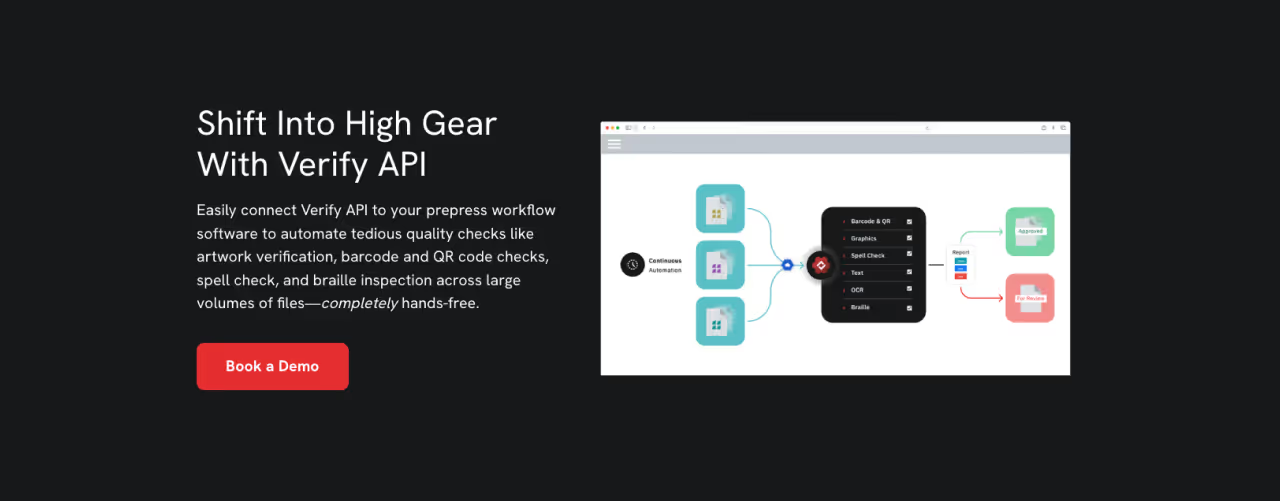
Instead of an operator opening a file, running a check, and saving a report, an API integration can trigger automated QA the moment a file enters your system.
Seamless Integration for Better Throughput
When you use an API to drive your prepress quality checks, the process looks different:
- A customer uploads a file to your web portal.
- The system automatically sends the file to the API.
- The API runs a pre-flight check for 50+ common errors.
- If the file is clean, it moves directly to the next stage of the prepress workflow.
- If errors are found, the system alerts the customer or operator immediately.
This "touchless" workflow means your team only touches files that actually have problems. The clean files sail through, dramatically increasing job throughput without increasing headcount.
Measuring the ROI: Key Metrics to Watch
When evaluating automation tools, you need to look at specific metrics. Here is where the real efficiency gains happen.
1. Reduction in Prepress Cycle Time
How long does a job sit in prepress? If manual quality checks take 15 minutes per job, and you process 20 jobs a day, that is five hours of labor. Automated QA can reduce that check time to seconds.
If you save just 10 minutes per job on 20 jobs a day, you save over 16 hours a week. That is nearly half a full-time employee's workload that can be redirected toward high-value tasks like color correction or complex structural design.
2. Elimination of Rework and Reprints
The most tangible ROI comes from errors you prevent. Quality control failures are expensive. If a typo or a low-res image slips through to the press, you pay for:
- Wasted substrate (paper, board, film)
- Wasted ink and consumables
- Press downtime while setting up the reprint
- Expedited shipping to meet the original deadline
Prepress quality automation catches these issues before they enter production. By stopping bad files at the gate, you protect your margins.
3. Scalability Without Overhead
Growing your business usually means hiring more staff. With API-driven automation, you break the linear relationship between revenue growth and labor costs. You can double your order volume without needing to double your prepress staff because the software handles the volume surge. This scalability is crucial for businesses looking to expand into web-to-print markets where volume is high, but margins are tight.
Implementing Prepress Quality Automation
Transitioning to automated quality control does not have to be an all-or-nothing event. Start by identifying the most repetitive tasks your team handles. Is it checking for embedded fonts? Verifying trim boxes? Analyzing ink coverage?
Once you identify these bottlenecks, look for a solution that offers a robust API. This ensures that whatever tool you choose can talk to your existing MIS (Management Information System) or W2P (Web-to-Print) store.
Best Practices for Deployment
- Start Simple: Automate the binary pass/fail checks first (e.g., file dimensions, missing fonts).
- Define Tolerances: Configure your quality control in print and packaging settings carefully. You don't want to flag every minor issue that won't affect print quality.
- Empower Operators: Position automation as a tool that relieves boredom, not a replacement for their expertise. Let them focus on the creative problem-solving that machines can't do.
Ready to Increase ROI?
The ROI of prepress quality automation is measurable and immediate.
By leveraging an API to handle routine quality checks, you transform your prepress workflow from a cost center into a productivity engine. You save time, slash error rates, and create the capacity to say "yes" to more work.
In an industry where margins are tight and speed is currency, investing in automated QA isn't just a technical upgrade, it's a smart business strategy.
Ready to streamline your operations? Explore how GlobalVision’s Verify API can transform your prepress workflow today.