

Hybrid Software & GlobalVision Are Supercharging Prepress
Connect Hybrid CLOUDFLOW and GlobalVision’s Verify API to embed continuous quality checks within your prepress workflow.

Proofreading and Quality Control,
Built-In and Hands-Free
Automate tedious tasks like artwork verification, barcode and QR code checks, spell check, and braille inspection—delivering print-ready files at any scale.

Prepress Workflow Software With No Brakes
With automated quality checks from preflight through to imposition, your prepress workflow will move faster than ever. No bottlenecks. No delays.

Centralized Standards in Hybrid CLOUDFLOW
No more disjointed quality standards and inspection parameters across your teams and company. With Verify API, quality is centralized, making for a globally consistent output.

Proofreading API That Powers More Jobs
Leveraging the power of proofreading APIs across your workflow means taking on more jobs without hiring more people. Boost efficiency, boost revenue.
Continuous Prepress Workflow Automation
Once deployed, the Verify API and Hybrid CLOUDFLOW integration runs on autopilot. Errors get flagged instantly. Clean files keep moving.
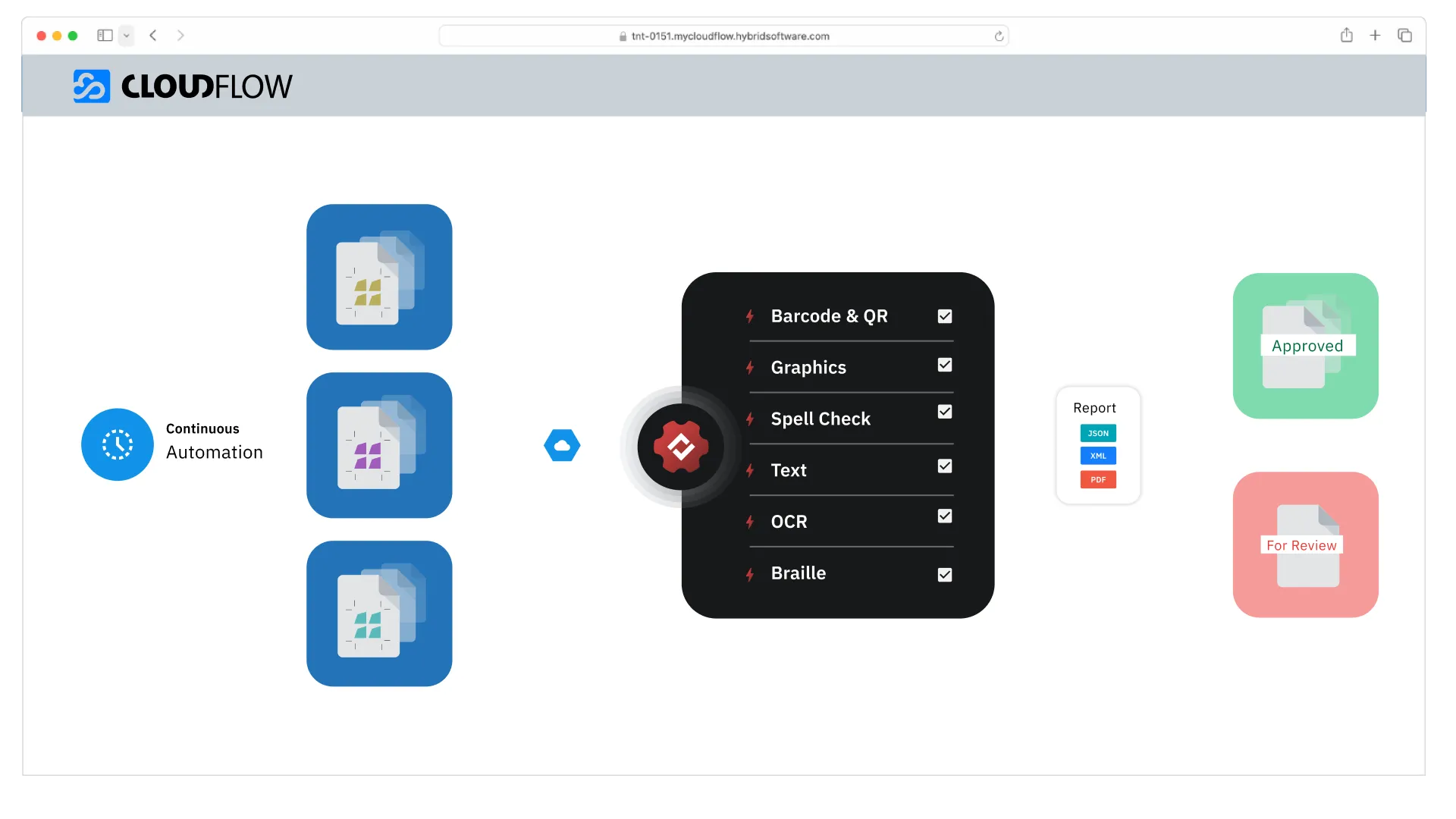
Leverage Verify’s Automated Proofreading and Quality Control Tools From CLOUDFLOW

Text Compare
Compares text character-for-character to identify all differences.

Graphics Compare
Compares artwork files pixel-for-pixel to detect any visual differences.

Barcode and QR Code Inspection
Automatically detects, decodes, and grades barcodes and QR codes for quality and compliance.

Braille Inspection
Inspects and translates braille regions in 44 languages, verifying correct translation, formatting, and compliance with Marburg Medium Font Standard.

Spell Check
Scans text for spelling errors in 44 languages, with support for custom, medical dictionaries, and multi-language files.

Font Size Verification
Compares text character-for-character to identify all differences.

OCR (Optical Character Recognition)
Extracts text from images or scanned documents, enabling automated analysis and comparison of content.

“This collaboration enhances CLOUDFLOW, giving users a seamless, automated solution for quality control [...]. By integrating GlobalVision’s powerful Verify API software, we are empowering prepress teams to focus on what matters most: delivering quality with speed, reliability, and consistency.”

Experience CLOUDFLOW & VerifyAPI
FAQs
What is a Verify API?
A Verify API is an inspection API that automatically checks files for issues like typos, barcode errors, or artwork inconsistencies. It helps teams catch problems early in the workflow without manual review.
How long does setup take for Verify API and Hybrid CLOUDFLOW?
Most teams can get the integration live within days, not weeks. Verify API was built for rapid deployment and minimal disruption. You'll need:
- Access to Hybrid CLOUDFLOW
- Basic API credentials
- A clear set of inspection rules or targets
Setup can be as simple as installing a few endpoints and letting your files flow.
Can I use this integration to standardize quality control across teams?
Absolutely. The quality control API lets you define inspection rules once and apply them consistently across departments, brands, or production sites. This ensures:
- Fewer manual errors
- Unified compliance across markets
- Faster onboarding of new teams and jobs
- A single source of truth for quality checks
Is Verify API compatible with other hybrid software platforms?
Yes. Verify API is designed to integrate with any hybrid software that supports RESTful APIs. It’s platform-agnostic, meaning it can connect with custom systems, middleware, or even standalone modules beyond CLOUDFLOW.
What types of inspection APIs are included?
Verify API provides a complete suite of automated quality control APIs, including:
- Text compare
- Graphics compare
- Spell check
- Barcode and QR code validation
- Braille and color inspection
- OCR and font checks
These inspection APIs can be triggered automatically throughout your workflow, enabling true prepress automation.
Does this integration support Hybrid Software CLOUDFLOW software natively?
Yes. The Verify API integration was purpose-built for Hybrid’s CLOUDFLOW platform. Whether you're using a custom hybrid software cloudflow configuration or running Workspace out of the box, Verify API fits seamlessly into your environment.
How does Verify API enhance Hybrid prepress software?
Verify API brings automated quality control directly into hybrid prepress software by embedding inspection checkpoints at key stages:
- Text and graphics comparison
- Barcode and QR code validation
- Spell check and OCR
- Braille inspection
- Font size verification
Together, Hybrid CLOUDFLOW and Verify API reduce manual touchpoints, eliminate delays, and scale output—without sacrificing accuracy.
What do developers need to know about Verify API?
Verify API leverages REST API technology and is easy to integrate with any prepress automation software. Its stateless design means faster performance and easy scaling—ideal for fast-moving prepress environments. Verify API is supported by solid documentation for developers.
What is Verify API?
Verify API delivers the power of GlobalVision’s industry-leading inspection engine—through a lightweight, easy-to-deploy API. It gives you access to the same proofreading, inspection, and compliance tools used by top packaging teams, all inside your existing systems.