
Le logiciel de comparaison de texte de Verify Compare, approuvé par les secteurs réglementés
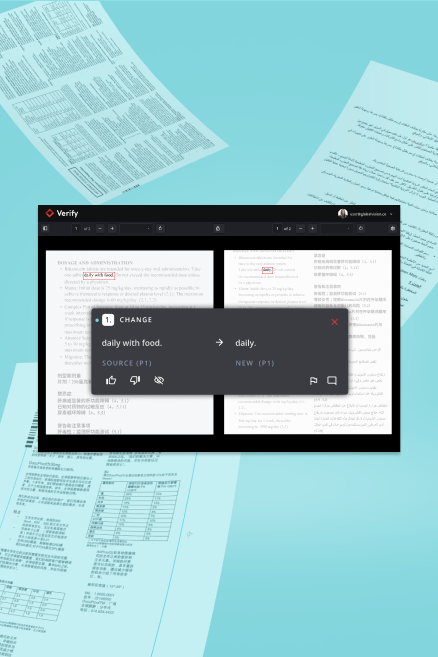
Repérez la moindre différence, quel que soit la mise en page, grâce à une comparaison de texte instantanée caractère par caractère, propulsée par notre moteur d'inspection IA.

« Nous avons facilement et minutieusement comparé des illustrations en carton nouvelles et anciennes à l'aide du logiciel Web [Text Compare]. L'interface permet vraiment de trouver les différences de manière claire et facile. »


Un logiciel de comparaison de texte rapide qui détecte les écarts dans toutes les langues
Ayez l'esprit tranquille grâce à une comparaison de documents effectuée à la vitesse de l'éclair. Qu'il s'agisse de comparer un mémoire à une maquette, des dossiers réglementaires, des éléments d'étiquetage ou tout autre document, faites confiance à l'outil de comparaison de texte de Verify Compare pour un travail rapide et précis.
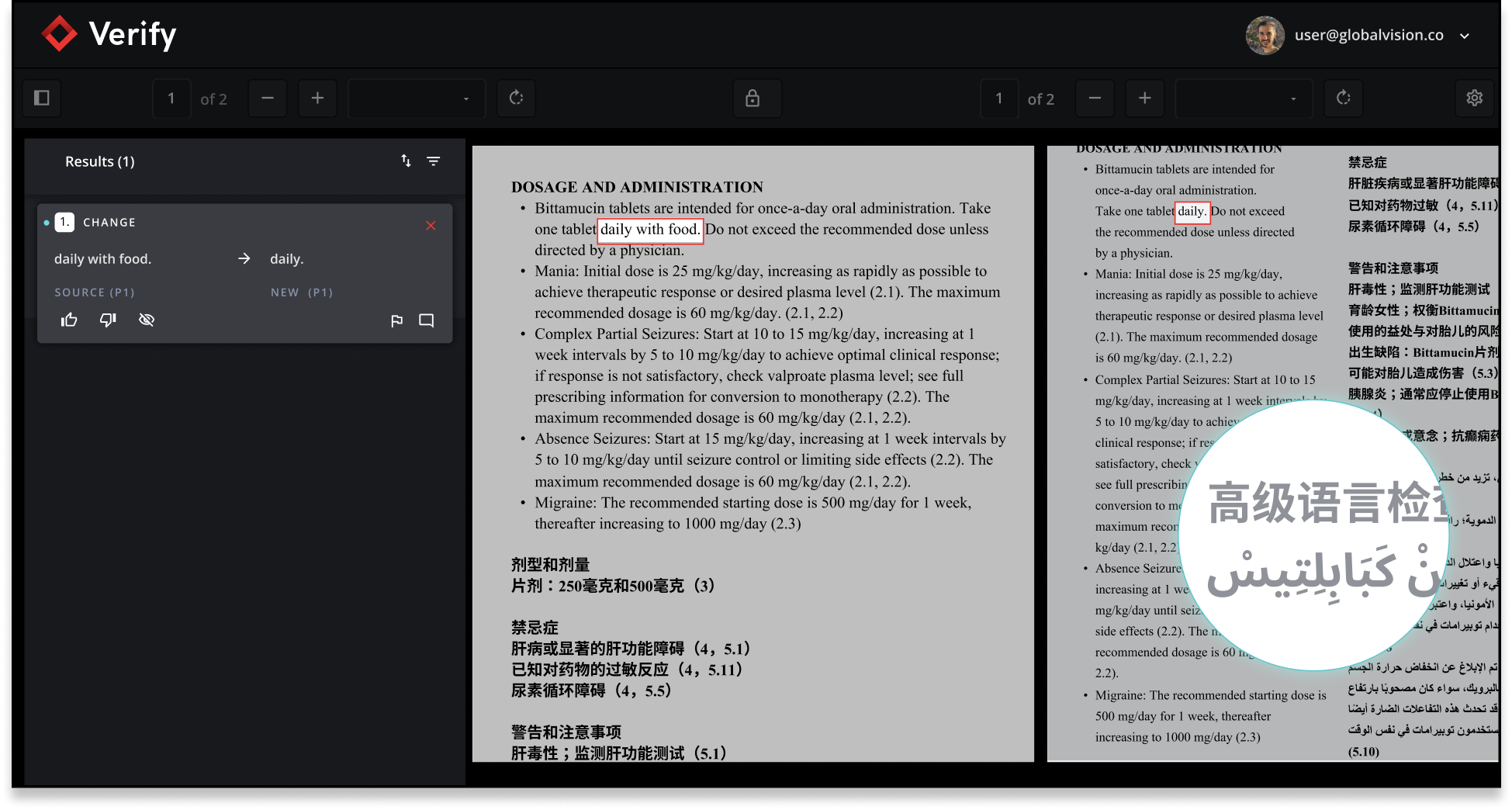
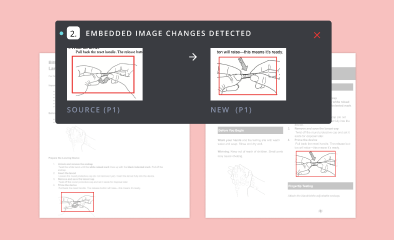
Comparaison automatique de texte avec images intégrées
Comparez sans effort des documents contenant des images intégrées, comme des notices pharmaceutiques ou des supports promotionnels, en quelques secondes. Repérez instantanément chaque différence, tant au niveau du texte que des visuels, pour avancer en toute confiance.
Inspection instantanée de texte : du brief à la maquette
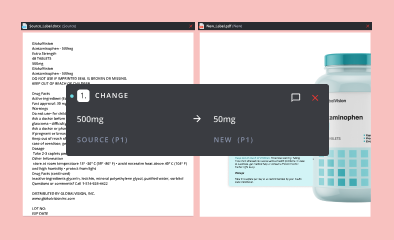
Comparer manuellement des documents de synthèse à des maquettes, comme des données brutes par rapport à des étiquettes conçues ou des modèles QRD, est une tâche fastidieuse en raison des différences de mise en page, de polices et de disposition du contenu. Laissez Text Compare s'en charger et gagnez un temps précieux avec une précision inégalée.
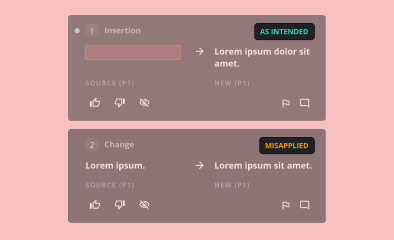
Outil de vérification de texte pour les annotations
Propulsé par notre moteur d'inspection IA™, vous pouvez vérifier rapidement que chaque modification souhaitée a bien été appliquée à vos fichiers. Le logiciel analyse instantanément les annotations par rapport à votre dernière version, signalant immédiatement les changements effectués et ceux nécessitant encore votre attention.
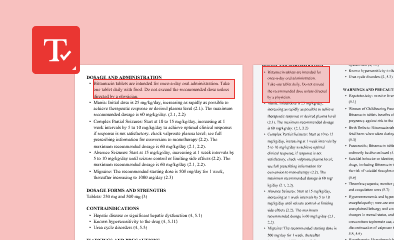
Comparez uniquement des zones de texte spécifiques
Concentrez-vous sur ce qui compte vraiment. Grâce à nos outils intégrés de zonage de texte, vous pouvez facilement cibler et vérifier uniquement les zones clés de votre fichier, éliminant ainsi le superflu pour obtenir des résultats précis et pertinents. Restez concentré, gagnez en rapidité et maintenez votre élan.

Logiciel d'inspection qui ignore le texte non pertinent
Indiquez précisément au logiciel quel texte, comme les numéros de page ou les en-têtes, n'est pas pertinent pour vos besoins grâce à l'outil Ignorer le texte. Éliminez le superflu, concentrez-vous sur l'essentiel et accélérez votre travail.
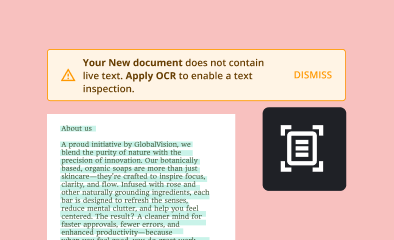
Inspecteur de texte OCR alimenté par l'IA
Vous travaillez avec des fichiers dont le texte n'est pas modifiable ? Notre fonctionnalité OCR (Reconnaissance Optique de Caractères) utilise l'IA pour extraire le texte avec une précision extrême, facilitant ainsi la comparaison de fichiers ou l'exécution de corrections orthographiques rapides et précises.
FAQ
What is Text Compare and how fonctionne-t-il ?
Text Compare est un logiciel de vérification de texte performant, conçu pour comparer automatiquement les documents et en valider l'exactitude. Il met en évidence les différences, garantit l'intégrité du contenu et optimise les processus de relecture pour les secteurs réglementés.
Qui peut bénéficier de l'utilisation d'un outil de vérification de texte tel que Text Compare ?
Text Compare est idéal pour les professionnels des secteurs réglementés tels que les produits pharmaceutiques, juridiques et financiers, où l'exactitude et la conformité des documents sont essentielles. Il permet aux équipes de gagner du temps, de réduire les erreurs et de répondre efficacement aux exigences réglementaires.
Comment les logiciels de relecture automatisés destinés aux secteurs réglementés améliorent-ils la conformité ?
Un logiciel de relecture automatisé pour les secteurs réglementés garantit que chaque version du document est vérifiée pour détecter les incohérences, ce qui réduit le risque de non-conformité et facilite les pistes d'audit pour les soumissions réglementaires.
Puis-je personnaliser les inspections dans le logiciel Verify Compare pour des cas d'utilisation spécifiques ?
Oui. Le logiciel Verify Compare intègre des outils flexibles tels que le zonage de texte, les zones d'exclusion et le suivi des annotations, vous permettant d'adapter vos inspections à vos besoins précis. Qu'il s'agisse de vérifier des modifications dans un QRD, d'isoler des sections clés dans un document juridique ou de comparer des textes promotionnels annotés, le logiciel s'adapte à votre flux de travail sans ajouter d'étapes manuelles.
Quels sont les formats de fichiers pris en charge par Text Compare ?
Text Compare prend en charge un large éventail de formats de fichiers, notamment :
- DOC/DOCX
- PPT/PPTX
- XLS/XLSX
- XML (nouvelle prise en charge du téléchargement XML, reportez-vous à la section ci-dessous pour plus de détails) - y compris la prise en charge du format SPL
- PNG
- JPG
- JPEG
- Fichiers TIFF
- Fichiers ZIP (contenant uniquement des documents SPL)
- CSV
- IA (en mode compatibilité)
- HTML
Comment Text Compare garantit-il la sécurité et la confidentialité des données ?
Text Compare utilise un cryptage de niveau professionnel et des protocoles de traitement sécurisés pour protéger les documents sensibles, ce qui en fait un outil de vérification de texte fiable pour les organisations ayant des besoins stricts en matière de confidentialité des données.
Text Compare peut-il s'intégrer à d'autres systèmes de gestion de documents ?
Oui, Text Compare offre une intégration parfaite avec les principaux systèmes de gestion de documents et de flux de travail, permettant une vérification automatique des documents dans le cadre de vos processus existants.
Quelles sont les principales caractéristiques du logiciel de relecture automatique de Text Compare pour les secteurs réglementés ?
Les principales fonctionnalités incluent la détection automatique des modifications, la comparaison côte à côte, la création de rapports détaillés, le traitement par lots et des règles de vérification personnalisables adaptées aux environnements axés sur la conformité.
Text Compare convient-il aux projets de vérification de documents à grande échelle ?
Absolument. Text Compare est conçu pour gérer de grands volumes de documents, ce qui en fait une solution logicielle de vérification de texte idéale pour les cas d'utilisation des entreprises et des secteurs réglementés.
En quoi Text Compare diffère-t-il de la relecture manuelle ?
Contrairement à la relecture manuelle, le logiciel de relecture automatique de Text Compare identifie rapidement les différences, même les plus subtiles, entre les documents, réduisant ainsi les erreurs humaines et accélérant considérablement les cycles de révision.
Comment puis-je commencer à utiliser Text Compare ?
Tu peux demandez une démo ou commencez un essai gratuit pour découvrir comment le logiciel de vérification de texte de Text Compare peut rationaliser vos processus de révision et de conformité des documents.
Pourquoi GlobalVision a-t-il renommé Verify en Verify Compare ?
Nous avons renommé Verify en Verify Compare afin de mieux refléter les fonctionnalités réelles du produit et de clarifier sa place au sein de la gamme GlobalVision. Ce changement est purement cosmétique ; vous retrouverez toujours les mêmes capacités performantes d'inspection d'étiquettes et d'éléments graphiques.