


Production deadlines don't wait for printing errors. When a high-volume packaging printer needs hundreds of thousands of units ready by Friday, the printing method either keeps pace or becomes the bottleneck that stalls production and drives up costs. That's where flexographic printing comes in.
Introduction to Flexographic Printing
Flexographic printing (often called flexo printing) uses raised images on flexible relief plates to transfer ink onto substrates. Modern flexographic presses, whether narrow-, mid-, or wide-web, can reach speeds nearing 600 meters per minute, though real-world speeds depend on the job. Raised plate surfaces contact an ink-metering roller, pick up precise ink volumes, then transfer that ink directly to material moving through the press.
What makes flexography different is its material range. Plastic films, aluminum foil, corrugated boards, and paper (substrates that give other printing methods trouble) run through flexographic presses without issue. While digital printing excels at short runs and offset lithography delivers superior results on paper, flexography dominates packaging differently. It handles diverse materials at speeds other methods can't match while maintaining quality across millions of impressions.
Flexographic printing produces the vast majority of labels you see, and powers large volumes of flexible packaging, with corrugated applications continuing to play a significant role in many operations. Pharmaceutical companies rely on flexography for packaging that meets strict quality and consistency requirements, while consumer brands use it to maintain reliable shelf presentation at scale. As plate technology and ink chemistry continue improving, flexography remains the backbone of how packaged products reach consumers.
The History and Evolution of Flexographic Printing
Flexographic printing started as crude rubber stamping in the late 1800s, limited by basic dyes and inconsistent quality. The breakthrough came when synthetic polymers replaced natural rubber in plates during the 1950s and 1960s, delivering durability that made million-impression runs practical for the first time. Anilox roller technology emerged around the same period, using precisely engraved cells to meter ink accurately enough for consistent color matching across production runs. These advances moved flexography from a cheap alternative to a production method brands could actually depend on.
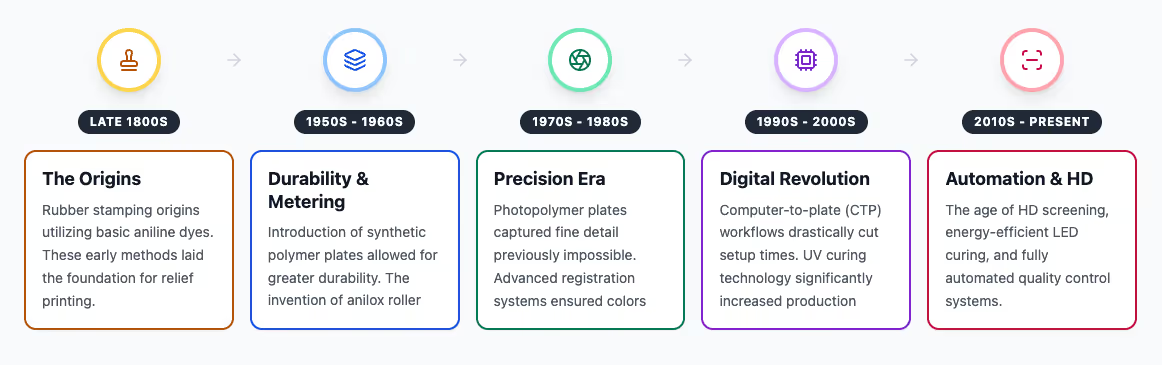
Photopolymer plates in the 1970s and 1980s changed what flexography could reproduce. Consumer brands competing for shelf space needed sharper graphics than rubber plates could deliver, and photopolymer formulations finally captured the detail required. Registration systems evolved to keep colors aligned within micrometers while press speeds increased. These improvements mean flexo quality now rivals gravure in some packaging applications, though gravure remains the benchmark for ultra-high resolution or continuous-tone work.
Computer-to-plate workflows from the 1990s forward cut setup time from days to hours, which mattered as product launch cycles compressed. UV and LED curing enabled press speeds beyond 600 meters per minute while food safety regulations drove development of low-migration inks for direct food contact packaging. High-definition screening now delivers resolution that competes with gravure in many applications. The current equipment handles substrates and quality levels that would have required multiple printing methods twenty years ago.
How Flexographic Printing Works: The Basic Process
Flexographic printing transfers ink through a series of precision cylinders. Ink flows from an ink fountain (reservoir) to a fountain roller or metering roller, which picks up ink and begins the transfer. From there, the ink moves through precision metering systems to a flexible relief plate carrying the image. The raised surfaces on the plate transfer the ink directly to substrate passing between cylinders. Each component maintains consistent ink transfer across millions of impressions, making the process reliable at commercial production speeds.
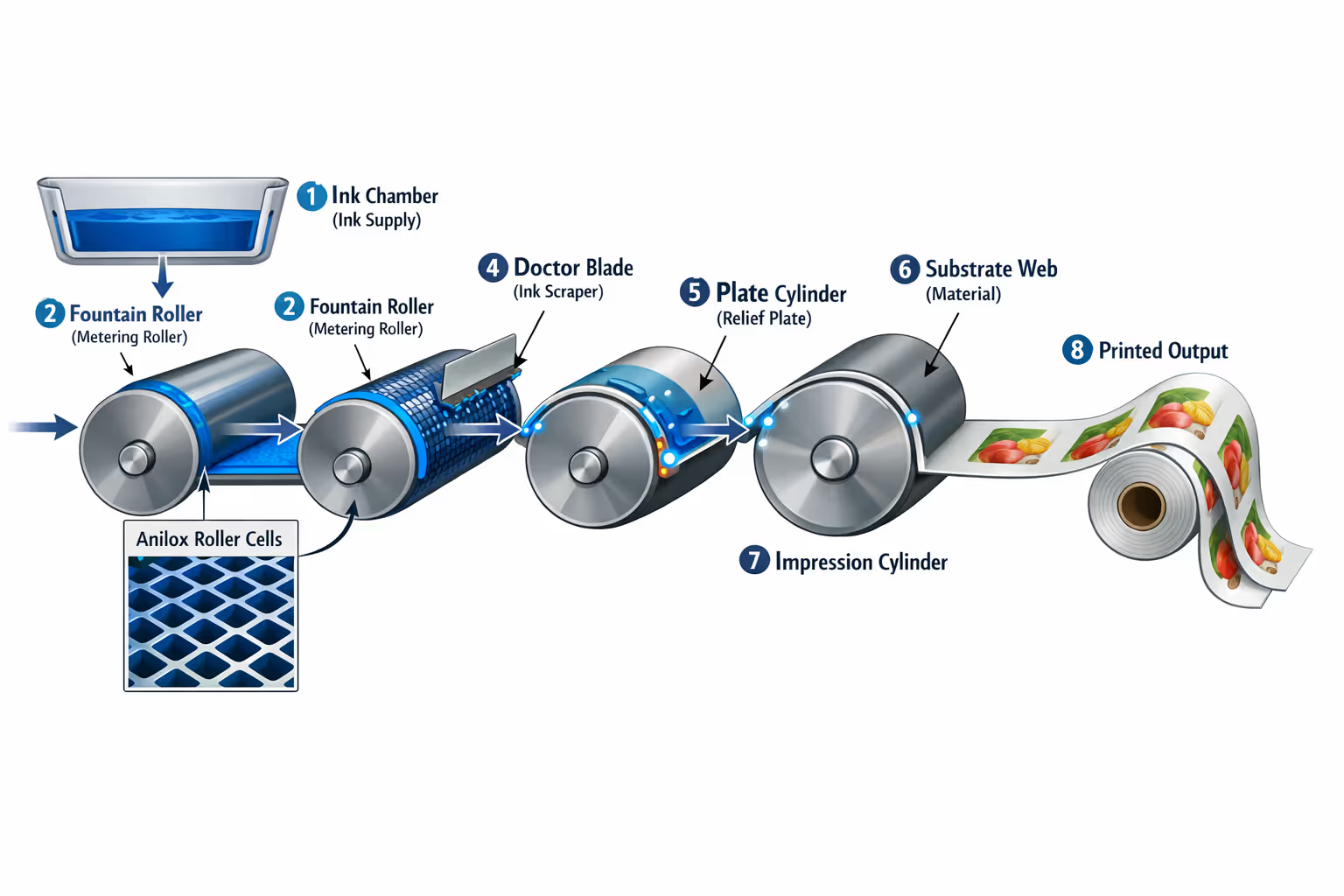
Modern presses repeat this sequence across multiple printing stations, each adding a different color or coating. Registration systems keep each color aligned within micrometers, which matters when printing detailed graphics or text where misalignment shows immediately. Drying systems between stations use hot air or UV light to cure ink before the next color applies, preventing smearing and allowing press speeds exceeding 600 meters per minute.
Consistent ink transfer comes from balancing multiple factors. The anilox roller's cell geometry and plate hardness control how much ink reaches the substrate and how it spreads. Substrate surface properties affect adhesion and dot formation, while press speed affects how ink cures between color stations.
This direct transfer method handles materials other printing techniques can't. Corrugated board, flexible films, tissue-thin wraps, rigid plastic sheets, solid sheets — the flexible plate adapts to each surface, letting the same press handle all of them. Offset's water-based chemistry restricts substrate options. Gravure's expensive cylinders only pay off at extremely high volumes. Flexography delivers the middle ground most packaging needs: quality that meets brand standards with the flexibility to switch between materials without changing equipment.
Essential Components of a Flexographic Press
Modern presses handle millions of impressions consistently while switching between substrates and jobs quickly. That reliability comes from how these systems work together.
The anilox roller has more impact on print quality than any other component. This chrome-plated cylinder features finely engraved cells that meter exact ink volumes onto the printing plate, with cell geometry controlling ink capacity — how much ink transfers and spreads. Wrong anilox specs create quality problems throughout production, so printers stock multiple rollers with different cell configurations.
Automation separates current presses from older equipment. Earlier systems needed operators to manually set impression pressure, correct registration, and match colors by eye, a process that consumed hours and wasted material during every setup. Current presses handle these adjustments automatically through closed-loop monitoring and sensor-based controls, so setup that once took hours now finishes in minutes.
UV and LED curing opened up substrates traditional drying couldn't handle. Hot air systems work for solvent based inks on paper and board, but they limit press speed and require exhaust ventilation. UV curing changed that by hardening ink instantly through light exposure, eliminating drying time between colors and making heat-sensitive films practical for the first time. LED systems deliver the same instant cure with significantly lower energy consumption. The drying system determines what substrates a press can run, how fast it operates, and what jobs make economic sense.
Flexographic Printing Plates: Materials and Production
Flexographic plates have come a long way from the rubber stamps that started the industry. Modern photopolymer plates capture fine detail and last through millions of impressions, with plate material evolving from natural rubber to advanced polymer plate formulations that deliver sharper reproduction. Computer-to-plate systems use lasers to harden specific areas of photopolymer material, creating raised surfaces that carry the image. These digital photopolymer plates go from design file to finished plate in hours instead of days, reproducing detail more sharply than the rubber or polymer plate versions and metal plate cylinders they replaced.
Plates come in different specifications for different jobs, functioning as the image carrier that determines print reproduction. Thicker, softer plates work better for rough surfaces like corrugated board while thinner, harder plates deliver sharper detail on smooth films and papers. Digital workflows give printers control over these characteristics in ways that weren't possible with film-based methods. Adjusting flexo plates for specific presses and substrates is a major reason flexographic print quality has improved so much over the past decade.
Inks and Colorants in Flexographic Printing
Flexographic printing inks need to dry quickly while adhering to diverse substrates, matching colors consistently, and meeting environmental standards that have become increasingly strict. Three main ink families cover most applications, with each working best for specific materials:
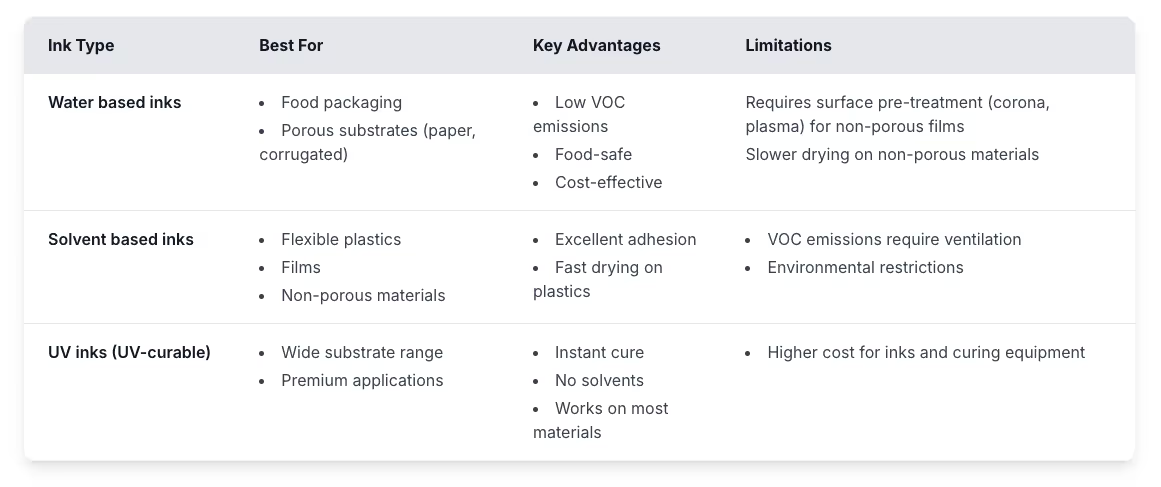
Beyond these three main types, specialty flexographic inks like metallics and opaque whites handle premium applications. Printers match colors using either pre-mixed spot colors for brand consistency or CMYK combinations for broader color ranges. Bio-based and low-migration sustainable inks keep replacing traditional formulations, pushed by regulations and customer requirements for sustainable packaging.
Compatible Substrates and Materials
Flexography handles materials other printing methods can't, from tissue-thin films to heavy corrugated board. The flexible plate conforms to uneven surfaces, which explains why it works across such diverse substrate types.
Paper and corrugated board make up a large portion of flexographic production, with coated papers delivering the sharpest images and corrugated working well because the plate adapts to the fluting. Flexible plastics and plastic films for food packaging run just as easily, accommodating different thicknesses whether wrapping bread, frozen foods, or snacks.
Labels use layered constructions, but flexography manages these composite structures at high speeds. Specialty substrates like aluminum foil and corrugated plastic also work well because the flexible plate adapts where rigid printing surfaces can't. This material flexibility is why packaging printing operations depend on flexography when they need to switch between different substrate types.
Prepress Operations and Setup Procedures
Every successful flexographic job starts well before ink touches substrate. Prepress operations and careful press setup separate efficient production from expensive trial and error.
1. File Preparation: Flexographic printing behaves differently than digital files suggest. Dots expand slightly during printing, so designers build compensation into artwork from the start. Fine lines and small text need minimum thickness to survive the plate-making process and print reliably. Colors that touch get slight overlaps called trapping, preventing white gaps if one color shifts microscopically during the run.
2. Color Separation and Proofing: Converting artwork into individual printing plates requires adjustments for how ink behaves on the actual substrate. Software applies curves that compensate for dot spread based on press and substrate. Digital proofs provide quick approval but can't perfectly simulate flexographic characteristics. When accuracy matters most, press proofs using actual production conditions answer questions definitively.
3. Plate Mounting and Registration: Mounting flexible plates to cylinders using double sided adhesive tape requires care since any bubbles or wrinkles create visible defects in printed output. Each print job needs precise mounting to avoid quality issues. Registration systems use camera-detected marks to align each color, with modern equipment automating most adjustments through stored presets. Operators verify alignment visually and make final corrections.
4. Ink Preparation: Spot colors get mixed according to formulas for each print job while process colors typically load premixed from suppliers. Viscosity affects how ink flows and dries, so operators adjust it based on substrate type and press speed.
5. Press Setup and Validation: Setting impression pressure determines how firmly the plate contacts the substrate during printing. Modern presses calculate starting points automatically, but operators adjust pressure until ink transfers completely without overcompressing the plate. The first sheets off the press get measured for color density, checked for registration accuracy, and inspected for defects. Production doesn't run at full speed until these validation checks confirm the setup.

Quality Control and Troubleshooting
Print defects that reach customers can range from annoying to dangerous depending on what's being printed. A misprinted "best by" date causes customer complaints. A wrong dosage instruction on pharmaceutical packaging can lead to patient harm, regulatory action, and recalls spanning multiple markets. Catching problems early means catching them before they become expensive disasters.
Common flexographic printing problems:
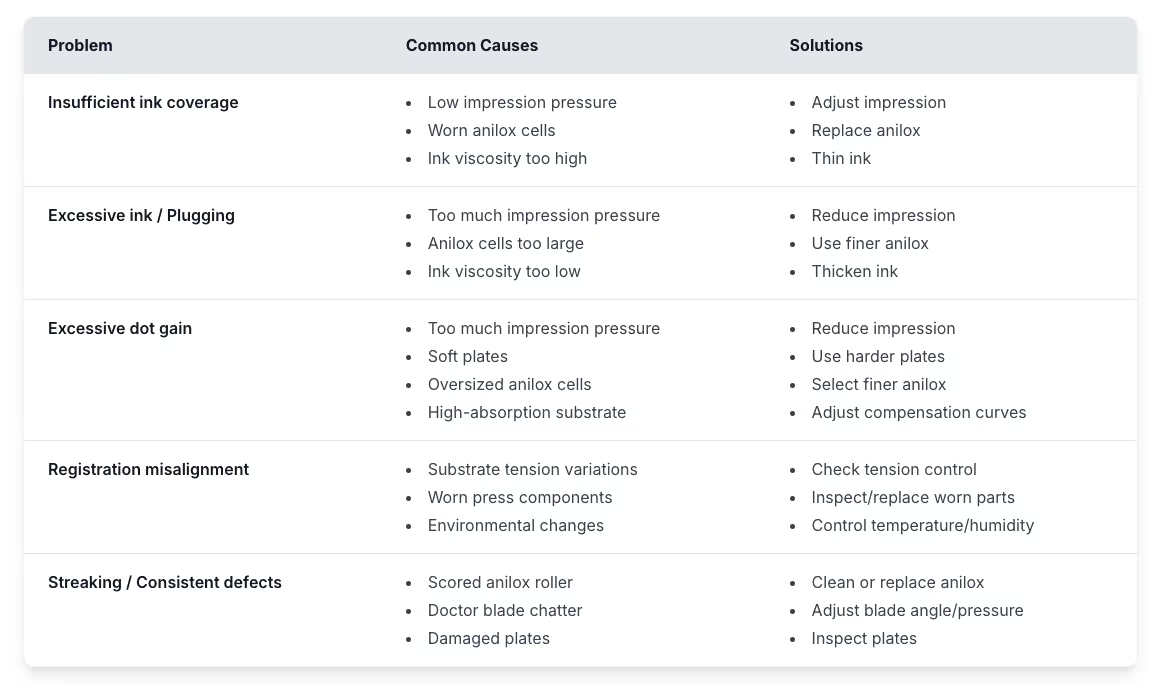
The challenge with flexographic quality control is that problems often show up gradually rather than suddenly. An anilox roller doesn’t go from perfect to scored overnight, but it does deteriorate slowly across production runs. Registration doesn’t fail completely, it drifts by micrometers until someone notices the colors don’t quite align. These gradual shifts make them harder to catch through periodic sampling, especially when press speeds mean thousands of impressions happen between sample pulls.
Preventing these problems requires matching inspection intensity to risk level. High-stakes applications like pharmaceutical packaging typically combine automated monitoring with human verification, creating the documentation regulatory audits demand. Commercial packaging operations might rely more heavily on periodic sampling, pulling sheets at regular intervals for manual review. Either approach works best when press maintenance stays consistent. Keeping equipment clean and replacing worn components on schedule prevents most quality issues before they start, letting operators focus on production rather than constant troubleshooting.
Post-Press Operations and Finishing
Printing creates raw material, and finishing turns it into usable products:
- Die-cutting separates individual labels from continuous webs
- Heat sealing forms printed films into pouches and bags
- Converting equipment cuts slots, scores fold lines, and applies adhesive to create boxes from corrugated sheets
- Lamination, coating, embossing, and cold foil stamping add functional or decorative properties beyond basic forming
Post-press inspection catches defects that survived printing, but also reveals problems that developed during finishing itself. A label die-cut might land slightly off center, or heat sealing could create distortion that makes barcodes unscannable. These finishing-stage issues compound printing defects. A borderline registration problem that was acceptable during printing can become problematic once die-cutting removes material around it. Operations typically inspect at multiple points throughout finishing rather than waiting until the end, since catching problems earlier reduces waste.
Technological Advances in Flexographic Printing
Flexographic quality has improved dramatically over the past decade. Plates became thinner while capturing finer detail, anilox rollers gained precision in ink transfer, and screening techniques advanced to reproduce images more accurately. These improvements working together let flexography compete for jobs that once required gravure printing. Extended color gamut printing expanded possibilities by using seven ink colors instead of four, letting printers match most brand colors without mixing custom inks or dedicating press stations to spot colors.
Automation changed how presses run. Early systems handled single tasks, but current equipment automates entire job setups with press parameters that save and reload automatically. Color systems monitor and correct density in real time while operators manage exceptions rather than making constant manual adjustments. Digital connections extend this integration beyond individual machines, moving files from design through production tracking and quality documentation without the handoffs that used to create delays.
LED UV curing became practical as prices dropped, delivering instant cure without heat that would damage sensitive films. Sustainability improvements happened alongside these technical advances, with renewable materials replacing petroleum-based ingredients in ink formulations while press designs reduced energy consumption. Waste reduction strategies that once seemed aspirational became standard operating practice, though adoption varies by region and operation size. AI applications started appearing in quality inspection and equipment monitoring, though the technology remains in early adoption stages.
Research continues on potential advances. Nano-patterned anilox rollers could improve ink transfer beyond what current engraving achieves. Development work on thinner plates aims to capture finer detail while maintaining durability. Direct imaging systems under investigation might eventually eliminate traditional platemaking steps, though practical implementation challenges remain.
Commercial Applications and Industry Sectors
Packaging makes up most flexographic production. Flexible films wrap snack foods, frozen vegetables, and countless other products, printing graphics on multi-layer structures that protect contents. Corrugated boxes print at speeds that keep pace with box-making equipment, with the flexible plate handling rough board surfaces that cause problems for other methods. Food packaging requires inks that won't migrate into contents, which the flexographic process handles through approved materials and validated processes that digital printing hasn't caught up to yet.
Labels use pressure-sensitive materials with multiple layers, which flexography handles easily. Self-adhesive labels and similar composite structures run at high speeds while accommodating the layered construction, and presses add foiling and embossing effects inline to create premium labels at production speeds. Pharmaceutical packaging needs similar precision and documentation, from blister packs to instruction inserts. Regulatory requirements demand validation records and serialization tracking that flexography delivers through decades of established practice in controlled industries.
Beyond packaging and labels, flexography handles everything from newspapers to printed electronics. What these applications share is substrate diversity that other printing methods struggle with.
Comparing Flexographic Printing to Alternative Methods
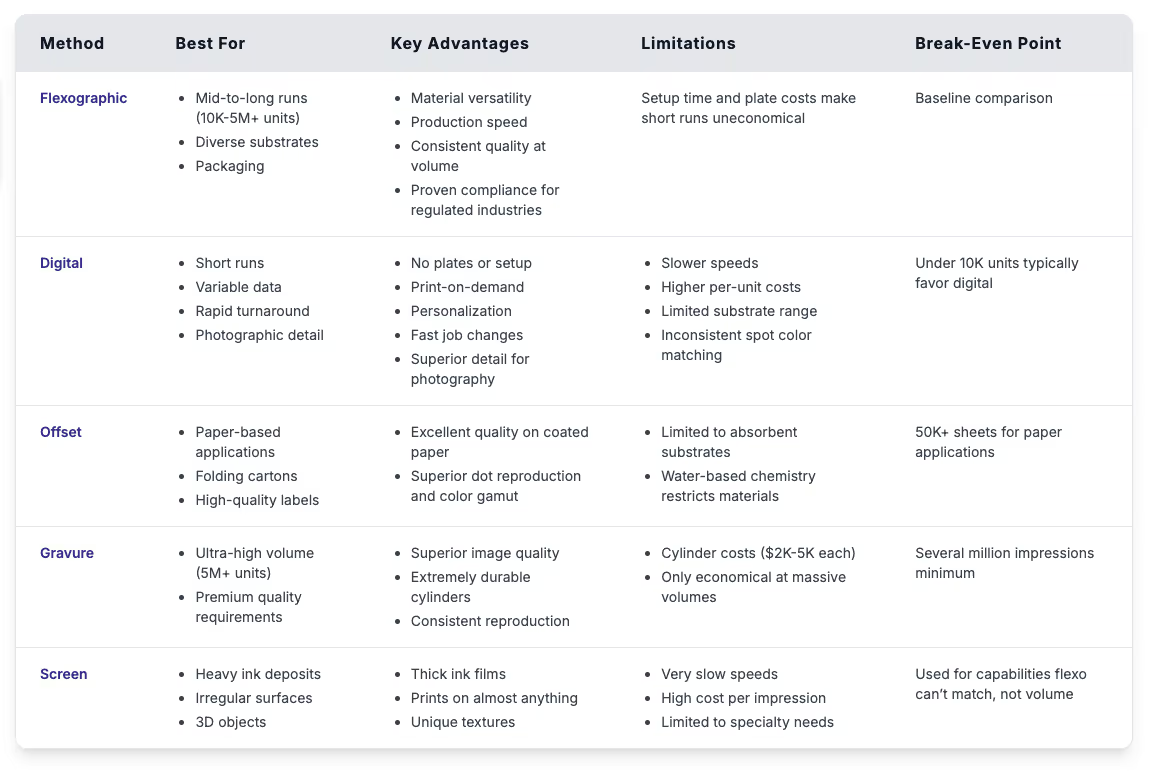
Choosing the right printing method means balancing costs against quality needs. Flexographic plates cost more than digital's zero-plate approach but far less than gravure cylinders. Setup takes hours compared to digital's minutes, but once running, flexographic presses print faster than digital systems can match. Thinner ink films reduce material costs compared to digital's heavier deposits, and energy costs per printed piece drop as flexographic speeds increase while digital maintains the same per-unit energy use regardless of volume.
Quality needs matter as much as costs when selecting a method. Offset and gravure deliver superior results for publications requiring photographic reproduction, while digital works well for short runs where quick turnaround matters. Flexography delivers high quality output between these extremes, meeting packaging standards at production speeds while fitting the economics that work for runs from tens of thousands to millions of printed materials. Substrate type, required quality level, production volume, and timeline all factor into the decision.
Environmental Considerations and Sustainability
Environmental requirements increasingly determine which printers major brands will work with, making sustainability a business necessity rather than just regulatory compliance. Supplier audits now include environmental practices alongside quality metrics. Validated low-migration inks have become standard for pharmaceutical work, while retailers won’t stock products without certified sustainable materials. Printers who can’t demonstrate these capabilities lose access to large accounts, regardless of how competitive their pricing or quality might be.
Ink chemistry
- Water-based inks replaced solvents for food packaging, cutting emissions dramatically
- UV inks contain no solvents and cure instantly under light
- LED curing systems use far less energy than conventional UV
- Bio-based ingredients replace petroleum in formulations
- Specialized formulations prevent ink from migrating into packaged food
Energy and waste
- Heat recovery systems capture and reuse warmth from drying operations
- Better color control reduces setup waste
- Automated inspection catches defects early, stopping bad production before it continues
Sustainable materials
- Certified sustainable forestry paper (FSC, SFI)
- Single-polymer packaging that recycles more easily than multi-layer laminates
- Increased recycled content in substrates
Lower energy costs and reduced waste often pay back investments quickly while meeting the environmental expectations brands now have for their printing partners.
Selecting the Right Flexographic Printing Partner
Choosing a printer affects what your packaging looks like, when it arrives, and what you pay. Beyond technical capabilities, the relationship needs to actually work when problems come up or timelines get tight.
Look for partners who ask about your business and proactively catch potential problems before you submit files. Production samples should come from actual runs, not perfect pieces created for presentations. Visiting during production shows how operations really run versus how they look when visitors are expected, and current customers can tell you how the printer handles problems and whether communication happens quickly when things go wrong.
Don't compare pricing on per-unit rates alone since rush charges, plates, setup, and shipping all factor into total costs. Volume pricing or annual agreements might make sense for ongoing work. The right partner often costs less overall than the cheapest quote through better quality and fewer problems.
Printer Evaluation Checklist:
Technical Capabilities
☐ Ask what presses they run and whether they handle your materials and sizes
☐ Discuss your volumes to make sure you fit their capacity without being too small or too large
☐ Ask: "What happens if your main press breaks down during my job?"
☐ Ask if they make plates in-house and how long it takes from files to finished plates
☐ Ask to see color-matched work similar to what you need
Quality & Compliance
☐ Ask what certifications they have and check if they cover your industry
☐ For regulated products, ask to see how they validate their processes
☐ Ask: "Can you walk me through how you check quality?"
☐ Ask: "What happens when something fails inspection?"
☐ Ask to see examples of their batch records or traceability documentation
Service & Communication
☐ Ask who handles your account day-to-day and how they manage multiple projects
☐ Ask: "How do you handle rush jobs?" and "What if I need to change the schedule?”
☐ Ask: "How long does it typically take from approved files to delivery?"
☐ Ask: "How do you let me know when problems come up?"
☐ Check that their file formats and color requirements work with how you operate
Sustainability
☐ Ask what environmental certifications they have
☐ Ask if they can share carbon footprint data for your jobs
☐ Ask what sustainable material and ink options they offer
☐ Ask about their waste reduction and energy practices
Sample Evaluation
☐ Ask for samples from real production, not special pieces made to look good
☐ Visit when they're actually running jobs
☐ While visiting, watch: how clean and organized things are, how staff work together, equipment condition
☐ Get samples from several different runs to check consistency
References & Pricing
☐ Ask for 2-3 current customers you can talk to, preferably in your industry
☐ When calling references, ask: "How do they handle problems?" and "How's communication?"
☐ Get detailed pricing that shows: per-unit cost, plates, setup, rush fees, shipping
☐ Ask about volume pricing or annual contracts if you'll have ongoing work
Even with a strong printing partner, errors can slip through on press. Registration may drift, graphics can drop out, and barcodes sometimes fail to decode cleanly. GlobalVision’s Verify Inline monitors every job in real time, comparing each capture to the approved file so defects are caught early, not downstream..