

Scale Quality Checks in Esko Automation Engine With Verify Compare
Embed native automated inspections directly in Automation Engine. Catch text, graphics, barcode, and braille errors without breaking your flow. It’s the unskippable quality milestone that keeps your files - and your press - flying.
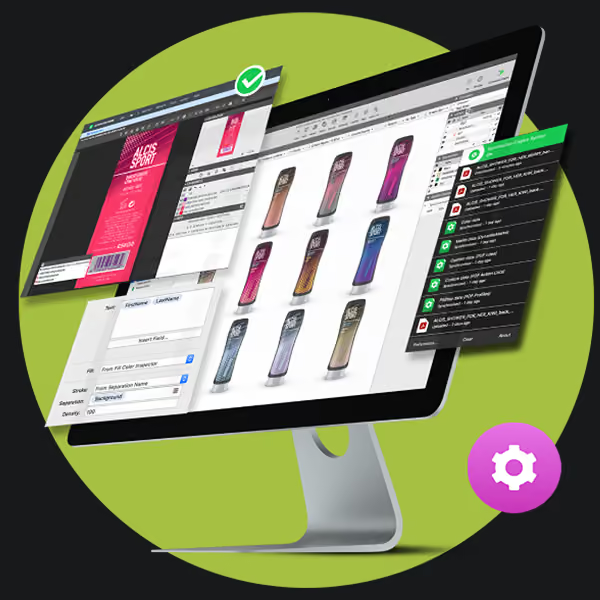


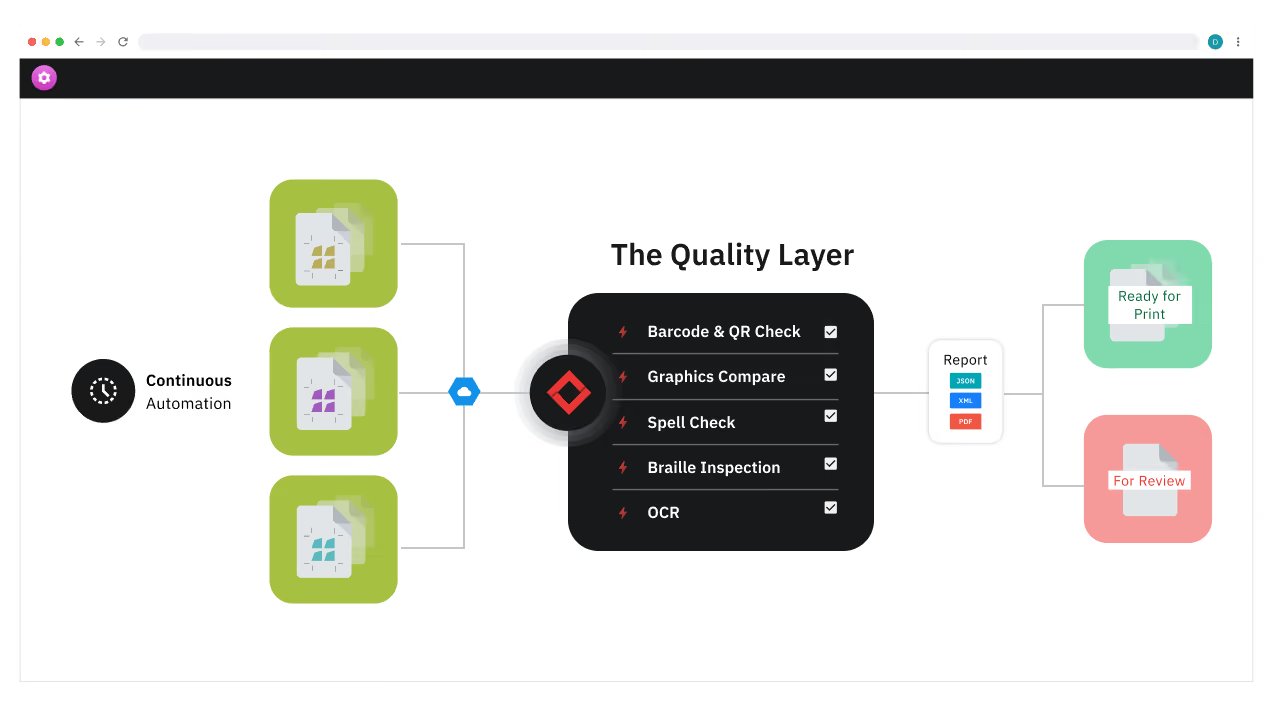
Verify Compare: The Quality Layer of Esko Workflows
Verify Compare runs inspections in the background of your Automation Engine workflow - so you can catch errors early and keep prepress and production flowing without manual checks.

Quality Checkpoints in Your Esko Prepress Workflow
Stop drowning in manual checks. Set quality checkpoints and let Verify Compare take over. It runs automated inspections wherever you need them from preflight to imposition, with no interruptions.

Artwork Automation = More Jobs, Less Rework
Empower your team to scale output and handle more jobs. Reduce the risk of rework before files ever hit the press with uncompromising accuracy and intelligent noise reduction.

Standardize Prepress Checks Across Teams
Centralize quality compliance across your global organization. By embedding Verify Compare, you ensure every file meets strict brand and regulatory standards within the secure Esko ecosystem.

End-to-End Security in Your Esko Ecosystem
Protect your intellectual property by keeping files in a secure, closed-loop environment. Run automated inspections without exporting to third-party software, ensuring strict data compliance and integrity at every step.
Native, Seamless, Automated
Your Automation Engine is now more powerful, as GlobalVision has become the official quality layer of Esko. We’ve turned quality control into an automated, background process. Files move freely, inspections happen silently, and errors are flagged instantly. This seamless integration ensures that the right quality check happens on the right file, at the exact right time.
As inspections run and errors are flagged, you have the option to view the results in Verify Compare, or view the report directly within the Esko Viewer.

Working With Customers In Esko WebCenter?
Check out the Verify Compare & Esko WebCenter integration.
FAQs
How does this integration enhance artwork automation?
By embedding inspection as a core workflow step, we remove the "human bottleneck." Files are checked automatically as they move through the system, powering scalable [artwork automation] and drastically reducing time-to-press.
How does inspection work with Esko artwork files?
Inspection runs seamlessly within Esko artwork workflows. Automated checks—including text, graphics, [esko barcode], and braille—run in the background without the need for manual uploads or external file exports. Results are instantly available within the system, so teams can resolve issues without leaving their familiar environment.
What does Verify Compare inspect in prepress workflows?
Verify Compare checks:
• Text (character-by-character)
• Graphics (pixel-based differences)
• Barcodes and QR codes (grading + verification)
• Braille (spacing + accuracy)
• Font size and layout alignment
Can I review inspection results directly in the Esko Viewer?
Yes. Once inspections are complete, results, the report can be viewed directly in the Esko Viewer. This allows teams to quickly assess flagged differences and take action without switching tools or breaking the artwork review flow.
Can I customize inspection checkpoints within Esko Automation Engine?
Yes. Since it is fully integrated into the engine architecture, you can configure your workflow to trigger inspections at any point, based on job type, product line, or specific file conditions.
Does this integration support Esko barcode inspections?
Yes. Verify Compare can automatically inspect barcodes within Esko workflows, checking for accuracy, readability, and compliance. When integrated with Esko, barcode inspections run in the background and any issues are flagged in the report, helping prepress teams catch errors before press time, and ensure compliance with CEN, ANSI, and ISO standards.