verify - webinar logo

Take Control of Your Inspections

More precision. More flexibility. Total Control.

See the updates live April 29th, 2026 at 11 AM EST | 5 PM CEST

Rebekah Feldman - Senior Product Manager at GlobalVision
Host:
Rebekah Feldman
Senior Product Manager
Greg Inose - Product Manager  at GlobalVision
Host:
Greg Inose
Product Manager
Jonathan Rossy - Director of Product  at GlobalVision
Host:
Jonathan Rossy
Director of Product
Abstract black layered geometric shapes with subtle gradients and shadows.

When Inspections Get Complex, You Need More Than Automation. You Need Control.

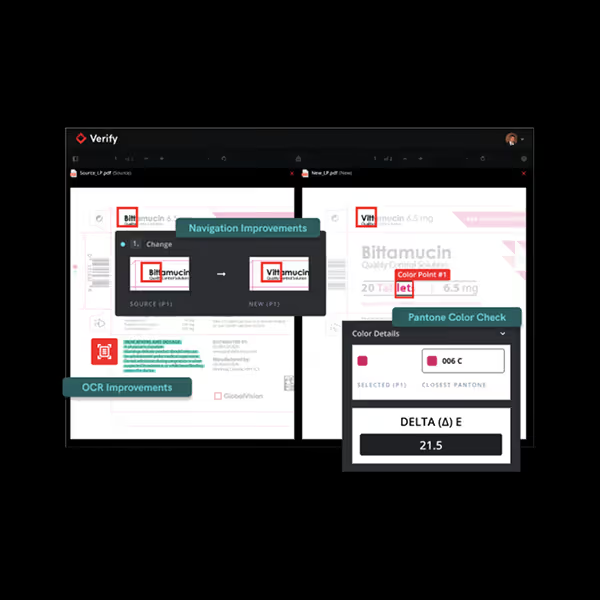
Verify’s April Release streamlines the way you navigate, align, and inspect your files, with added built-in color checks to catch even the smallest differences. Performance is boosted across complex layouts and graphics-heavy files, so inspections are faster and more reliable.

With this release, enjoy a more efficient, precise, and controlled inspection process from start to finish.

Screenshot of a software interface showing a comparison of two PDF documents highlighting navigation and OCR improvements with color point checks and Pantone color delta value 21.5.

Here’s What’s In Store:

Red icon showing a test tube and three droplet shapes representing color inspection.

Built-In Pantone® Color Checks

Click anywhere on your file to view exact color values and corresponding Pantone® references.

Red lightning bolt icon.

Performance Improvements Across Inspections

Faster, smoother handling of large files, flattened files, and complex workflows, reducing friction in your inspections.

Red speedometer icon indicating speed or performance.

Navigate Faster Between Matched Text

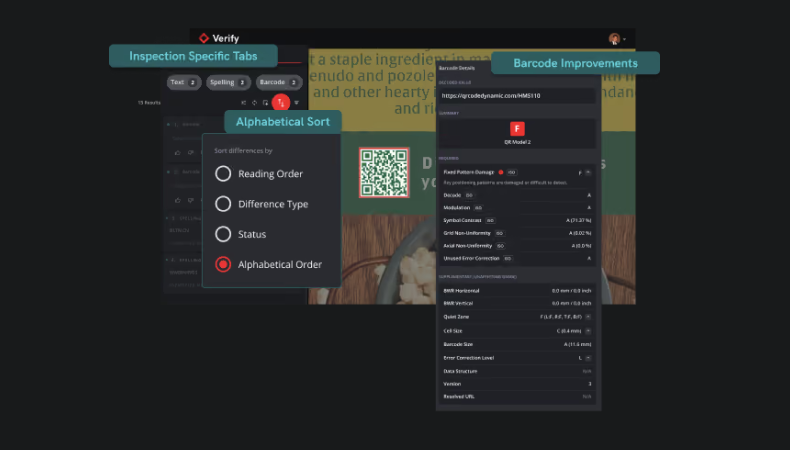
Jump easily between corresponding content across source and new files, even with complex layouts or foreign languages.

Red icon depicting a magnifying glass over a mountain landscape with a sun or moon in the sky.

Visual Difference Thumbnails in Reports

Quickly spot and understand changes between documents with clearer, more visual reporting.

Red and black target with three concentric circles and crosshairs in the center.

Align Graphics Comparisons

Place anchors manually and take control of the alignment and scale correction of your graphics inspections to keep reviews moving.

All of That, and More.

Join us live to see how Verify is bringing greater flexibility, sharper precision, and complete control over your files.