
Vector Graphics

Vector graphics are digital images made from lines, shapes, and curves that are defined by mathematical equations, not pixels. Because they’re math-based, vector graphics can be resized to any size without becoming blurry or pixelated. This makes them perfect for logos, icons, illustrations, and anything that needs to stay sharp at different sizes.
Why it Matters:
In print and packaging, vector graphics keep artwork crisp whether it’s printed on a small label or a giant box. They also make it easier for designers and printers to edit, scale, or adjust artwork without losing quality.
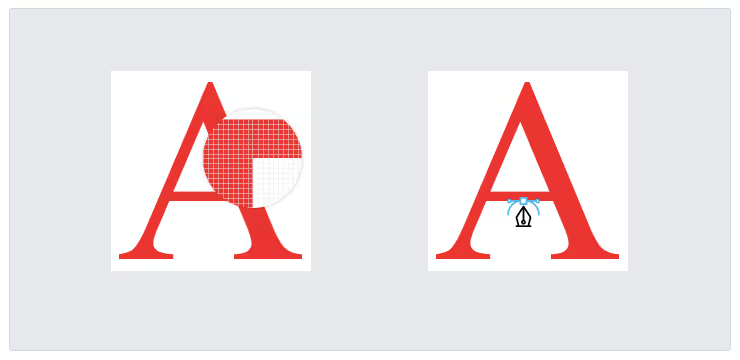
The Difference Between Raster and Vector Graphics Raster graphics are made of tiny pixels arranged in a grid. When you zoom in or stretch them, they can become blurry or pixelated. Photos, detailed textures, and complex images are usually raster.
Vector graphics, on the other hand, are made from mathematical paths. They can be scaled up or down without losing quality. Logos, icons, and illustrations are usually vector.
Simple breakdown:
- Raster = pixels (best for photos), can get blurry when enlarged
- Vector = shapes and math (best for logos and text), always stays sharp
Vector graphics use shapes and math, not pixels, so they stay sharp and clear at any size, making them ideal for high-quality print and packaging.
The Advantages of Vector Graphics:
- Scalable: Can be made larger or smaller with no loss of quality
- Lightweight files: Usually smaller than high-resolution images
- Easy to edit: Colors, shapes, and lines can be changed cleanly
- Perfect for print: Ensures logos, text, and illustrations stay sharp
Use Cases in Print and Packaging:
- Logos that must appear on multiple package sizes
- Icons and symbols like recycling signs or warnings
- Dielines created by packaging designers
- Illustrations used on labels or boxes
See Other Guides
The Ultimate Guide to Prepress Quality Control: From Preflight to Perfect Prints
Excellent quality control before printing turns a good business into a great one. Catching mistakes early and keeping your standards high makes every project run smoothly. Clients will be impressed by your reliable and detailed work.

How to Effectively Manage Print Samples with Automation
With so much competition between brands, packaging design is a key way to distinguish your company from others and thus persuade consumers to purchase your products.

OCR: Everything You Need to Know About Optical Character Recognition
GlobalVision’s newest, most innovative cloud-based proofreading software, Verify, is currently developing and testing the platform’s OCR capabilities that allow users to inspect flattened text on documents […]

Streamline Artwork Proofing From Prepress to Production
Elevate labeling and packaging accuracy with the market-leading artwork inspection software.